For designers and content writers who want to turn user research into well-organised product information and clear language. You will learn to group findings, frame customer needs, and present research-led decisions to teams.
9 lessons · 2 hr 31 min, plus 2 optional (77 min more with the optional lessons)
IxDF - Interaction Design Foundation · 2 min · Beginner
Start here: the UX and human-centred design foundations that later steps on information and language build on.
An introduction to human-computer interaction as the foundation of UX design, covering human psychology, human-centered design and interaction design processes. The course is aimed at UX designers, project managers, engineers and newcomers, and includes a portfolio project building interaction design case studies.
Adds the main user research methods, so you know where the findings that shape product language come from.
An introductory lecture from an IIT Guwahati design course on user research methods. The description gives only the course link and instructor, so the specific methods covered are not stated.
Adds concise storytelling from project work, an early lesson in choosing clear words to communicate what you did.
Ten practical steps for practising storytelling to answer questions in UX job interviews, aimed at designers looking for a job who want to stand out from other candidates.
Adds the Agile delivery context, so you can follow how product and content work is planned and shipped.
An overview of Agile by product designer and workshop facilitator Spencer Ayres. It covers what Agile is and why it still matters, the Scrum, Kanban and Extreme Programming methodologies, how IBM, Spotify and Google use Agile to innovate, and how Agile relates to facilitation.
Moves to intermediate: Jobs-to-be-Done turns research into customers' own needs and wording rather than features.
Explains the Jobs-to-Be-Done framework using Clayton Christensen's milkshake case study, covering functional, emotional and social jobs, hidden competitors and the four forces of progress. It is aimed at product managers who want to understand customer motivation beyond demographics.
Adds mapping a flow into every asset and task, a practical way to structure product information.
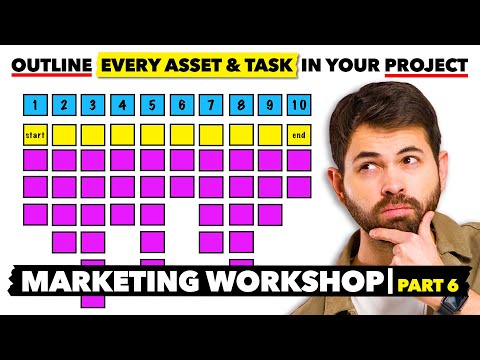
A walkthrough of a modified User Test Flow exercise from the Design Sprint, showing a team how to map every asset and task a campaign or project needs. It is part of a marketing workshop series and is aimed at people who run or join workshops.
Goes deeper into struggling moments and the progress customers want, building on the shorter JTBD overview.
Bob Moesta's talk at the Just Product Conference covers Jobs-to-be-Done techniques for uncovering customers' struggling moments and the progress they are trying to make. It is aimed at product managers who want deeper customer insight, with case studies.
Adds collaborative methods across design, product and engineering teams for communicating research-led work.
LinkedIn's Renee Reid and GitHub's Ash Guillaume share methods for building collaborative and inclusive design processes, especially for large remote teams. The livestream has a talk from each speaker, with Q&A after each.
Optional: adds running product reviews and gathering stakeholder input to drive decisions on content choices.
A Figma Slides product manager walks through running a product review in Figma Slides, covering how to gather the input needed, drive toward decisions and align stakeholders around the work. It is aimed at people who already run design reviews with teams.
Optional: adds a wider view of how research roles are changing, for those who want more on research practice.
A conversation between Maze's CEO and COO on how AI is blurring the line between user research and market research, and why research roles are converging. They discuss the shift from researcher as operator to orchestrator and treating research as a connected, continuous system of learning, drawing on Maze's State of Market Research Report.
For beginners who want to understand UX research and run a first user interview or usability test. You will be able to choose a suitable method, plan a short study and make sense of what you find.
For complete beginners who want a clear map of UX, from core ideas and research methods to wireframes and basic UI choices. You will be able to explain UX and run simple research and reviews.
This path is for educators and new learners who want to use Figma and FigJam in teaching. You will be able to set up a shared class file, plan a first lesson, and adapt activities using lessons from working educators.
For designers with some UX experience who want to apply product strategy, research, testing and microcopy to real products. You will be able to frame product decisions, plan remote usability tests, and review interface text.
;}.cls-2{fill:%2358d687;}.cls-3{fill:url(%23Degradado_sin_nombre_10);}.cls-4{fill:url(%23Degradado_sin_nombre_31);}.cls-5{fill:%238030d1;}.cls-6{fill:url(%23Degradado_sin_nombre_23);}%3c/style%3e%3clinearGradient%20id='Degradado_sin_nombre_17'%20x1='129.39'%20y1='83.35'%20x2='56.4'%20y2='162.54'%20gradientUnits='userSpaceOnUse'%3e%3cstop%20offset='0'%20stop-color='%23287d8c'/%3e%3cstop%20offset='1'%20stop-color='%2350b5db'/%3e%3c/linearGradient%3e%3clinearGradient%20id='Degradado_sin_nombre_10'%20x1='449.01'%20y1='190.97'%20x2='266.02'%20y2='78.2'%20gradientUnits='userSpaceOnUse'%3e%3cstop%20offset='0'%20stop-color='%23ffe286'/%3e%3cstop%20offset='1'%20stop-color='%23ffcd1d'/%3e%3c/linearGradient%3e%3clinearGradient%20id='Degradado_sin_nombre_31'%20x1='99.7'%20y1='309.69'%20x2='146.19'%20y2='485.35'%20gradientUnits='userSpaceOnUse'%3e%3cstop%20offset='0.01'%20stop-color='%23ff9464'/%3e%3cstop%20offset='1'%20stop-color='%23b3553a'/%3e%3c/linearGradient%3e%3clinearGradient%20id='Degradado_sin_nombre_23'%20x1='547.05'%20y1='208.96'%20x2='252.56'%20y2='438.86'%20gradientUnits='userSpaceOnUse'%3e%3cstop%20offset='0'%20stop-color='%23ff7da1'/%3e%3cstop%20offset='1'%20stop-color='%23f20b4f'/%3e%3c/linearGradient%3e%3c/defs%3e%3ctitle%3efavicon%3c/title%3e%3cg%20id='_Group_'%20data-name='<Group>'%3e%3cg%20id='_Group_2'%20data-name='<Group>'%3e%3cg%20id='_Group_3'%20data-name='<Group>'%3e%3cpath%20id='_Path_'%20data-name='<Path>'%20class='cls-1'%20d='M232.54,165.43a124.47,124.47,0,0,1-106.95,60.76h0A101.77,101.77,0,0,1,23.82,124.41V0L132.31,95.94A517.46,517.46,0,0,0,232.54,165.43Z'/%3e%3cpath%20id='_Path_2'%20data-name='<Path>'%20class='cls-2'%20d='M250,0V101.78a123.87,123.87,0,0,1-17.46,63.65A517.46,517.46,0,0,1,132.31,95.94L23.82,0Z'/%3e%3cpath%20id='_Path_3'%20data-name='<Path>'%20class='cls-3'%20d='M476.18,226.19a518.87,518.87,0,0,1-243.64-60.76A123.87,123.87,0,0,0,250,101.78V0A226.12,226.12,0,0,1,476.18,226.19Z'/%3e%3cpath%20id='_Path_4'%20data-name='<Path>'%20class='cls-4'%20d='M232.54,334.57a517.71,517.71,0,0,0-100.23,69.54L23.82,500V375.59A101.77,101.77,0,0,1,125.59,273.81h0A124.47,124.47,0,0,1,232.54,334.57Z'/%3e%3cpath%20id='_Path_5'%20data-name='<Path>'%20class='cls-5'%20d='M250,398.22V500H23.82l108.49-95.89a517.71,517.71,0,0,1,100.23-69.54A123.87,123.87,0,0,1,250,398.22Z'/%3e%3cpath%20id='_Path_6'%20data-name='<Path>'%20class='cls-6'%20d='M476.18,273.81A226.12,226.12,0,0,1,250,500V398.22a123.87,123.87,0,0,0-17.46-63.65A518.87,518.87,0,0,1,476.18,273.81Z'/%3e%3c/g%3e%3c/g%3e%3c/g%3e%3c/svg%3e)