Learning path

Vector Illustration in Illustrator: Beginner to Intermediate

For designers who know the basics of Adobe Illustrator and want to build complete vector illustrations, from shapes and tracing to scenes and characters. You will finish with a shaded, colour-built illustration of your own.

What you’ll learn

  • Build vector shapes with the Shape Builder and Pen tools
  • Trace a sketch into clean vector artwork using a template layer
  • Draw a flat character illustration with a cohesive colour palette
  • Create a layered landscape scene from a pencil sketch
  • Take an illustration from client brief to finished colour and shading in Illustrator

Lessons

  1. tutvid 19 min Beginner

    Start here: Shape Builder is the core skill for building vector shapes that every later project uses.

    A step-by-step Adobe Illustrator tutorial showing how to build a football shape using the Shape Builder tool, Snap to Point and clipping masks, then warp it into a stylised logo-ready design.

  2. Yes I'm a Designer 12 min Beginner

    Extends Shape Builder by building a pattern from basic shapes and adding simple shading for depth.

    A step-by-step Illustrator workflow for drawing a Celtic knot, covering gathering inspiration, building the knot's structure, using the Shape Builder tool and adding shading. It also invites viewers to try a short creative exercise.

  3. Yes I'm a Designer 8 min Beginner

    Applies shape and pen tools to a simple animal character in a short, focused build.

    A live Illustrator CC demonstration that walks through the drawing techniques and features used to build a panda in vector form. The description says it is divided into topics to make specific techniques easier to find.

  4. tutvid 10 min Beginner

    Introduces tracing a sketch into coloured vector shapes, the workflow the later character videos assume.

    A step-by-step Adobe Illustrator tutorial showing how to turn a sketch into a vector illustration of a YouTube personality. A sketch file is provided so viewers can follow along.

  5. Yes I'm a Designer 43 min Beginner

    Consolidates the Pen tool, Shape Builder and recolouring before the intermediate projects.

    A recorded seminar covering drawing techniques in Adobe Illustrator CC, including the Pen tool and its alternatives, and drawing with shapes. It shows methods such as Shape Builder, Transform effect, Recolor Artwork and Live Paint for building vector artwork.

  6. Astute Graphics - Solutions for Adobe Illustrator 13 min Intermediate

    Moves to intermediate tracing: a template layer and refined anchor points on a character sketch.

    Part 2 of a character illustration series shows how to trace a sketch into clean vector character artwork in Adobe Illustrator. It covers creating a template layer, building shapes, adjusting anchor points and grouping artwork, and is aimed at designers who already work in Illustrator.

  7. Spoon Graphics 11 min Intermediate

    Turns a rough sketch into a flat cartoon with a cohesive blue palette and simple shading.

    Shows how to convert a rough sketch of a cartoon yeti into a flat vector illustration in Adobe Illustrator, tracing with basic shapes, adding colour fills and strokes in a cool blue palette, and applying a simple shading technique that keeps the flat look. Suited to designers who already use Illustrator.

  8. tutvid 42 min Intermediate

    First full scene: layered landscape shapes and colour building from a pencil sketch.

    A tutorial on creating a moody sunset illustration from a pencil sketch in Adobe Illustrator, covering colour building and shape creation with a tablet. It is aimed at people who already use Illustrator.

  9. Kayla - Brand Identity Community 13 min Intermediate

    Closes the path with a full client-style process: brief, concepts, linework, palette and shading.

    Walks through a complete illustration project in Adobe Illustrator, from interpreting a client brief and sketching concepts to setting up the document, drawing linework, building a colour palette, shading and exporting the final artwork.

  10. Spoon Graphics 9 min Intermediate

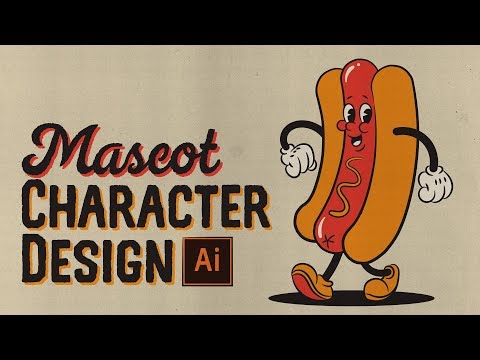
    Optional: a rubber hose mascot built with brush and blob tools and a limited palette.

    A step-by-step Adobe Illustrator tutorial on drawing a retro mascot character, a hot dog in the 1930s rubber hose cartoon style. It uses the brush and blob tools, a limited colour palette and subtle texturing, and shares brush settings for drawing character designs.

  11. Astute Graphics - Solutions for Adobe Illustrator 21 min Intermediate

    Optional: a detailed geometric scene built from simple shapes, keeping repeated details consistent.

    A tutorial in Adobe Illustrator where Erikas Chesonis builds a geometric crested caracara and cactus for a vintage-style matchbox design, starting from a sketch. It shows how to use simple shapes, repeated details, borders and plugin tools to keep paths clean. It is aimed at designers who already work in Illustrator.

When you've finished

Next path: Intermediate Illustration: Vector, Texture and Systems (Intermediate)

All paths in Illustration

Search and sort within Vector Illustration in Illustrator: Beginner to Intermediate

All paths
  • Learning pathBeginner → IntermediateIllustration

    Illustration Basics: Procreate to Figma Draw

    For beginners who want to draw digitally, this path moves from Procreate sketching to Figma vector tools and then Figma Draw brushes and effects. You will be able to take an illustration from first sketch to polished vector finish.

    5 lessons · 4 hr 44 min

  • Learning pathBeginner → AdvancedIllustration

    Painting Florals and Botanicals in Procreate

    This path is for illustrators who want to paint florals and gouache-style botanicals in Procreate. You will move from a single leaf to loose watercolour florals and finally to a planned winter bouquet.

    5 lessons · 70 min

  • Learning pathIntermediateIllustration

    Character Illustration: Design, Colour and Inking

    For intermediate illustrators who want to take a character from first idea to finished art. You will learn to develop character concepts, choose between sketching and direct inking, and build colour palettes that hold together.

    6 lessons · 73 min

  • Learning pathIntermediateCreative Process

    Building a Distinctive Creative Vision

    For intermediate makers in film, art and games who want their work to reflect their own story and stand out from generic output. You will learn to shape a vision you can defend.

    5 lessons · 1 hr 42 min, plus 1 optional