For beginners moving into product design who want to arrange type, layout and brand principles into a consistent visual system. By the end you will be able to apply type rules, work in Figma and keep interface visuals coherent.
7 lessons · 2 hr 20 min, plus 1 optional (8 min more with the optional lessons)
Start here: ten type rules give you the vocabulary for hierarchy, grouping and contrast used throughout the path.
A short graphic design tutorial presenting ten typography rules for arranging functional type in layouts. It covers hierarchy, flow, legibility, grouping and contrast for designers who are starting out.
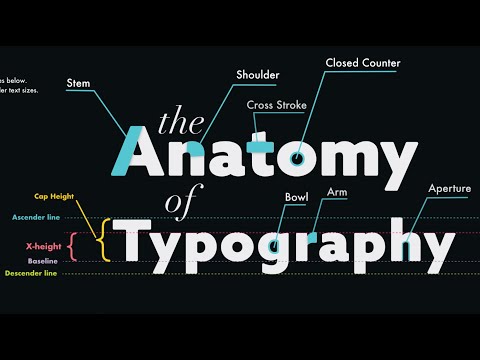
Adds typeface anatomy and spacing basics, so you can name what the ten rules act on.
A lesson on the anatomy of typefaces and core typography fundamentals, including hierarchy, spacing, contrast, alignment, kerning and leading, for creating clean graphic design layouts. It suits beginners and designers who want a structured overview of type.
A long beginner lesson on kerning, leading, tracking and common mistakes, with practice exercises to cement the fundamentals.
A beginner lesson on typography covering type anatomy, choosing fonts, kerning, leading and tracking, common mistakes, and practice exercises. It is part of a free graphic design fundamentals course.
Introduces Figma, the tool where you will apply type and layout to product work. Short and assumes no prior knowledge.
An introduction to Figma, a design tool for creating websites, mobile apps and prototypes, covering its user interface and how it differs from other design tools. It is aimed at beginners.
Carries the visual basics into UI with practical tips on usability and appearance, bridging type theory and interfaces.
A short video of UX and UI design tips, presented as part 2 of a top-five list. The description aims it at designers, developers and curious beginners, and mostly promotes a UI/UX ebook and course.
Shows where to find Material design guidance and tools, a first look at design-system thinking for product.
A walkthrough of the redesigned Material.io landing pages for Design, Develop and Tools, showing designers and developers how to find the Material tools and studies. It introduces the resources rather than teaching a design method in depth.
Optional stretch on how motion and CSS animation bring a visual language to the web. Not core to type and layout.
Shows how a motion designer can approach building animated web interfaces, using GSAP and CSS animation with a linked live demo and code pen. Suited to designers who already know basic animation and want to bring it to the web.
For beginners who want to understand interface design and build simple screens in Figma. You will be able to choose colours and type, lay out screens clearly, and polish a design.
This path is for beginners who want to learn the Figma editor by building real screens. You will move from the editor basics to auto layout, components, styles, variables and exporting assets for handoff.
For complete beginners who want to build the core habits of graphic design and apply them to posters and ads. You will learn to plan with purpose, choose colour and layout deliberately, and create simple, clear designs.
For beginners who want to understand type styles, choose fonts and set clear text in design tools. You will be able to classify typefaces, build a clear hierarchy and set text in Figma and Affinity.
;}.cls-2{fill:%2358d687;}.cls-3{fill:url(%23Degradado_sin_nombre_10);}.cls-4{fill:url(%23Degradado_sin_nombre_31);}.cls-5{fill:%238030d1;}.cls-6{fill:url(%23Degradado_sin_nombre_23);}%3c/style%3e%3clinearGradient%20id='Degradado_sin_nombre_17'%20x1='129.39'%20y1='83.35'%20x2='56.4'%20y2='162.54'%20gradientUnits='userSpaceOnUse'%3e%3cstop%20offset='0'%20stop-color='%23287d8c'/%3e%3cstop%20offset='1'%20stop-color='%2350b5db'/%3e%3c/linearGradient%3e%3clinearGradient%20id='Degradado_sin_nombre_10'%20x1='449.01'%20y1='190.97'%20x2='266.02'%20y2='78.2'%20gradientUnits='userSpaceOnUse'%3e%3cstop%20offset='0'%20stop-color='%23ffe286'/%3e%3cstop%20offset='1'%20stop-color='%23ffcd1d'/%3e%3c/linearGradient%3e%3clinearGradient%20id='Degradado_sin_nombre_31'%20x1='99.7'%20y1='309.69'%20x2='146.19'%20y2='485.35'%20gradientUnits='userSpaceOnUse'%3e%3cstop%20offset='0.01'%20stop-color='%23ff9464'/%3e%3cstop%20offset='1'%20stop-color='%23b3553a'/%3e%3c/linearGradient%3e%3clinearGradient%20id='Degradado_sin_nombre_23'%20x1='547.05'%20y1='208.96'%20x2='252.56'%20y2='438.86'%20gradientUnits='userSpaceOnUse'%3e%3cstop%20offset='0'%20stop-color='%23ff7da1'/%3e%3cstop%20offset='1'%20stop-color='%23f20b4f'/%3e%3c/linearGradient%3e%3c/defs%3e%3ctitle%3efavicon%3c/title%3e%3cg%20id='_Group_'%20data-name='<Group>'%3e%3cg%20id='_Group_2'%20data-name='<Group>'%3e%3cg%20id='_Group_3'%20data-name='<Group>'%3e%3cpath%20id='_Path_'%20data-name='<Path>'%20class='cls-1'%20d='M232.54,165.43a124.47,124.47,0,0,1-106.95,60.76h0A101.77,101.77,0,0,1,23.82,124.41V0L132.31,95.94A517.46,517.46,0,0,0,232.54,165.43Z'/%3e%3cpath%20id='_Path_2'%20data-name='<Path>'%20class='cls-2'%20d='M250,0V101.78a123.87,123.87,0,0,1-17.46,63.65A517.46,517.46,0,0,1,132.31,95.94L23.82,0Z'/%3e%3cpath%20id='_Path_3'%20data-name='<Path>'%20class='cls-3'%20d='M476.18,226.19a518.87,518.87,0,0,1-243.64-60.76A123.87,123.87,0,0,0,250,101.78V0A226.12,226.12,0,0,1,476.18,226.19Z'/%3e%3cpath%20id='_Path_4'%20data-name='<Path>'%20class='cls-4'%20d='M232.54,334.57a517.71,517.71,0,0,0-100.23,69.54L23.82,500V375.59A101.77,101.77,0,0,1,125.59,273.81h0A124.47,124.47,0,0,1,232.54,334.57Z'/%3e%3cpath%20id='_Path_5'%20data-name='<Path>'%20class='cls-5'%20d='M250,398.22V500H23.82l108.49-95.89a517.71,517.71,0,0,1,100.23-69.54A123.87,123.87,0,0,1,250,398.22Z'/%3e%3cpath%20id='_Path_6'%20data-name='<Path>'%20class='cls-6'%20d='M476.18,273.81A226.12,226.12,0,0,1,250,500V398.22a123.87,123.87,0,0,0-17.46-63.65A518.87,518.87,0,0,1,476.18,273.81Z'/%3e%3c/g%3e%3c/g%3e%3c/g%3e%3c/svg%3e)