Intermediate Illustration: Vector, Texture and Systems
For designers who already make basic vectors or digital drawings and want polished, distinctive illustrations. You will be able to produce detailed Figma and Photoshop work and set up an illustration system that a whole team can use.
5 lessons · 3 hr 21 min, plus 1 optional (23 min more with the optional lessons)
Start here: learn detailed vector building in Figma, including effects, naming conventions and layer order.
A Figma Config 2021 session in which Joey Lamelas shows how to build detailed vector illustrations in Figma. He covers visual effects, naming conventions, layer ordering, and using components and variants in creative work.
Adds texture, blend modes and masking, moving your polished vector work towards a more personal style.
A Config 2025 talk in which illustrator Inga Hampton shows her approach to vector art in Figma, covering blend modes, texture building and masking. She discusses letting go of structure and embracing imperfection in the creative process.
Shows a full sketch-to-finish Photoshop workflow, extending your layered illustration skills into painted work.
A long-form talk and demo from freelance illustrator Pierre Kleinhouse covering how he moves from a rough sketch to a finished illustration in Photoshop. It includes a live drawing demo, his use of personal references, and advice on practice, client responses and pricing.
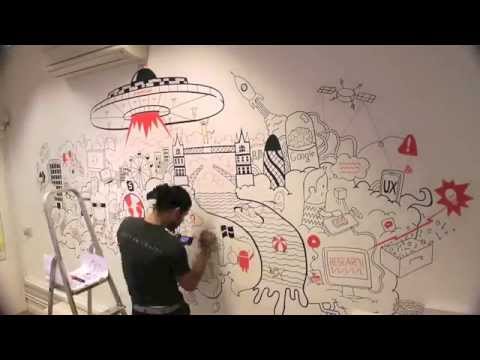
A short case study of a wall illustration made to a brief, showing how finished work answers a client's needs.
The video shows a wall illustration created for Amberlight's London offices by Felipe Caro. The brief combined Amberlight's services with the digital products people use, and the artwork features London landmarks and themes such as UX, apps and connectivity.
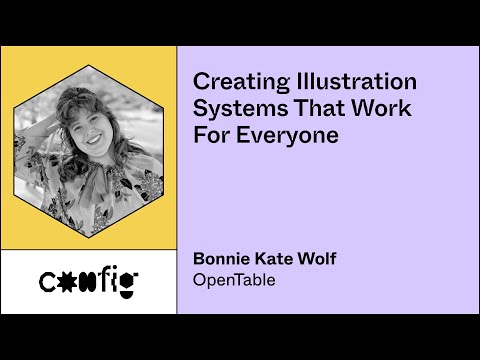
Moves from making single pieces to building an illustration system that any designer on a team can use consistently.
A Figma Config talk on building an illustration system that any designer on a team can use to make consistent illustrations. The speaker says no illustration experience is required and focuses on bold choices and robust, shared libraries.
Optional: structure a Figma file around a design system, custom icons and consistent naming for shared team files.
A designer walks through how he structures his Figma file, covering a design system, custom icons, grid setup, colour token naming and shadows. The interview is aimed at designers who already work in Figma and want to see a real-world file organisation.
For beginners who want to understand design systems and build shared styles and components in Figma. You will be able to set up a reusable library that your team can use.
5 lessons · 2 hr 18 min, plus 1 optional
Learning pathIntermediate → AdvancedDesign Systems
For designers and design system leads who already build components and want to keep a shared system working. You will be able to manage tokens, flexible components, governance, adoption and handoff to code.
For designers and content specialists ready to move beyond single assets, this path shows how to build, scale and govern brand identity systems using real company cases and guidelines.
For intermediate designers who want developers to build their designs accurately. You will learn to structure Figma files, prepare designs for handoff, and work alongside engineers.
;}.cls-2{fill:%2358d687;}.cls-3{fill:url(%23Degradado_sin_nombre_10);}.cls-4{fill:url(%23Degradado_sin_nombre_31);}.cls-5{fill:%238030d1;}.cls-6{fill:url(%23Degradado_sin_nombre_23);}%3c/style%3e%3clinearGradient%20id='Degradado_sin_nombre_17'%20x1='129.39'%20y1='83.35'%20x2='56.4'%20y2='162.54'%20gradientUnits='userSpaceOnUse'%3e%3cstop%20offset='0'%20stop-color='%23287d8c'/%3e%3cstop%20offset='1'%20stop-color='%2350b5db'/%3e%3c/linearGradient%3e%3clinearGradient%20id='Degradado_sin_nombre_10'%20x1='449.01'%20y1='190.97'%20x2='266.02'%20y2='78.2'%20gradientUnits='userSpaceOnUse'%3e%3cstop%20offset='0'%20stop-color='%23ffe286'/%3e%3cstop%20offset='1'%20stop-color='%23ffcd1d'/%3e%3c/linearGradient%3e%3clinearGradient%20id='Degradado_sin_nombre_31'%20x1='99.7'%20y1='309.69'%20x2='146.19'%20y2='485.35'%20gradientUnits='userSpaceOnUse'%3e%3cstop%20offset='0.01'%20stop-color='%23ff9464'/%3e%3cstop%20offset='1'%20stop-color='%23b3553a'/%3e%3c/linearGradient%3e%3clinearGradient%20id='Degradado_sin_nombre_23'%20x1='547.05'%20y1='208.96'%20x2='252.56'%20y2='438.86'%20gradientUnits='userSpaceOnUse'%3e%3cstop%20offset='0'%20stop-color='%23ff7da1'/%3e%3cstop%20offset='1'%20stop-color='%23f20b4f'/%3e%3c/linearGradient%3e%3c/defs%3e%3ctitle%3efavicon%3c/title%3e%3cg%20id='_Group_'%20data-name='<Group>'%3e%3cg%20id='_Group_2'%20data-name='<Group>'%3e%3cg%20id='_Group_3'%20data-name='<Group>'%3e%3cpath%20id='_Path_'%20data-name='<Path>'%20class='cls-1'%20d='M232.54,165.43a124.47,124.47,0,0,1-106.95,60.76h0A101.77,101.77,0,0,1,23.82,124.41V0L132.31,95.94A517.46,517.46,0,0,0,232.54,165.43Z'/%3e%3cpath%20id='_Path_2'%20data-name='<Path>'%20class='cls-2'%20d='M250,0V101.78a123.87,123.87,0,0,1-17.46,63.65A517.46,517.46,0,0,1,132.31,95.94L23.82,0Z'/%3e%3cpath%20id='_Path_3'%20data-name='<Path>'%20class='cls-3'%20d='M476.18,226.19a518.87,518.87,0,0,1-243.64-60.76A123.87,123.87,0,0,0,250,101.78V0A226.12,226.12,0,0,1,476.18,226.19Z'/%3e%3cpath%20id='_Path_4'%20data-name='<Path>'%20class='cls-4'%20d='M232.54,334.57a517.71,517.71,0,0,0-100.23,69.54L23.82,500V375.59A101.77,101.77,0,0,1,125.59,273.81h0A124.47,124.47,0,0,1,232.54,334.57Z'/%3e%3cpath%20id='_Path_5'%20data-name='<Path>'%20class='cls-5'%20d='M250,398.22V500H23.82l108.49-95.89a517.71,517.71,0,0,1,100.23-69.54A123.87,123.87,0,0,1,250,398.22Z'/%3e%3cpath%20id='_Path_6'%20data-name='<Path>'%20class='cls-6'%20d='M476.18,273.81A226.12,226.12,0,0,1,250,500V398.22a123.87,123.87,0,0,0-17.46-63.65A518.87,518.87,0,0,1,476.18,273.81Z'/%3e%3c/g%3e%3c/g%3e%3c/g%3e%3c/svg%3e)