Typography and Branding Path for Beginner Designers
For beginner graphic designers who want to set type well and bring brand thinking into their layouts. You will move from type rules and moodboards to presenting a logo to a client.
11 lessons · 3 hr 18 min, plus 2 optional (2 hr 55 min more with the optional lessons)
Start here: a quick orientation on common beginner mistakes, so you avoid tool-only learning before the skills arrive.
A beginner graphic designer's guide to five common mistakes, including relying only on Photoshop or Illustrator, watching too many tutorials, copying inspiration, chasing every trend, and building a portfolio too early. It is aimed at people learning graphic design who want to build stronger fundamentals and design thinking.
Adds the core type rules for hierarchy, flow, grouping and contrast that the later layout videos build on.
A short graphic design tutorial presenting ten typography rules for arranging functional type in layouts. It covers hierarchy, flow, legibility, grouping and contrast for designers who are starting out.
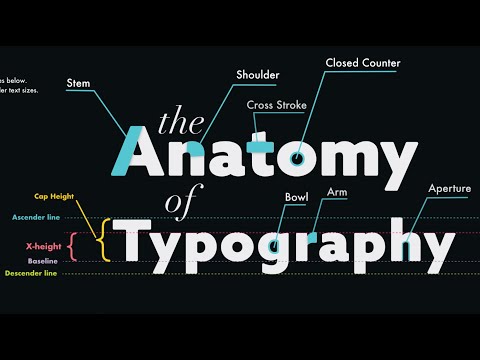
Adds the vocabulary of letterforms, kerning and leading, so you can name and adjust the type you see.
A lesson on the anatomy of typefaces and core typography fundamentals, including hierarchy, spacing, contrast, alignment, kerning and leading, for creating clean graphic design layouts. It suits beginners and designers who want a structured overview of type.
Adds a longer practice session on kerning, leading and tracking, with exercises to try after the basics.
A beginner lesson on typography covering type anatomy, choosing fonts, kerning, leading and tracking, common mistakes, and practice exercises. It is part of a free graphic design fundamentals course.
Adds practical ways to lift a plain layout using type, fonts, depth and composition, without starting over.
Shows practical ways to turn a basic graphic design into a more creative, professional-looking one by changing typography, fonts, depth and composition rather than starting over. Aimed at graphic design students, beginners and anyone building more creative designs.
Adds the idea that brand identity is more than a logo, introducing the first steps before any design work.
The video explains what brand identity is beyond a logo and house style, and introduces the brand concepts map as a way to build brand associations. It walks through the first steps of creating a brand identity, including asking customers or employees what associations they have with the brand.
Adds a practical brand step: building a moodboard from a brief, using the identity ideas you have just covered.
Explains what a moodboard is, why designers make one before a logo or brand identity project, and what to include such as imagery, typography, colours, packaging and patterns. It builds a moodboard from a fictional bakery brief to show how to collect and organise references.
Adds a hands-on logotype project from sketch to vector, joining the type skills with brand work.
A walkthrough of designing a logotype, covering brand overview, sketching ideas, refining and annotating sketches, balancing letterforms, and digitising the final mark as a vector in Illustrator. It suits designers who want a practical, step-by-step introduction to logo lettering.
Adds an intermediate focus on how composition and focal points steer attention, shown through poster design.
The video tracks the eyes of 40 viewers on famous movie posters and uses the heat maps to show how each was designed to capture attention. A24 poster designer Juan Luis Garcia breaks down posters such as Jurassic Park, Interstellar and Weapons to explain the design psychology behind them.
Adds critique of text-heavy layouts, asking you to judge hierarchy and art direct type decisions.
Chris Do and Art Center graduate Minhye review newspaper and magazine layouts, discussing what makes type, layout and design work and how to art direct a designer on typography. The video is part one of a classic episode from The Futur Academy.
Adds a talk on refreshing a brand through lettering details while keeping its original character.
A talk by lettering artist Jessica Hische on her process for logo refresh work, modernising existing brands while keeping their original character. She discusses why attention to small details matters and the rewards of slow, considered craftsmanship for clients and creatives.
Adds a short lesson on presenting one logo to a client with a stylescape, turning the work into practice.
Chris Do compares how he presented logos to clients in the past with how he presents them today, including how many options to show and a stylescape example. The video is aimed at designers who present logo work to clients.
Adds a full logo redesign case study, from research and sketches through to presenting the identity system.
A walkthrough of brand designer Maxwell Billings' unofficial redesign of the United Airlines logo, covering his research, sketches, Illustrator process and design system. It is aimed at designers who want to see how a logo and identity project is developed and presented.
For beginners who want to understand interface design and build simple screens in Figma. You will be able to choose colours and type, lay out screens clearly, and polish a design.
For complete beginners who want to build the core habits of graphic design and apply them to posters and ads. You will learn to plan with purpose, choose colour and layout deliberately, and create simple, clear designs.
For beginners who want to understand type styles, choose fonts and set clear text in design tools. You will be able to classify typefaces, build a clear hierarchy and set text in Figma and Affinity.
For beginners who want to understand branding beyond the logo and take a first brand project from references through to a printed touchpoint and a first look at guidelines. Each step adds one more piece of the identity.
;}.cls-2{fill:%2358d687;}.cls-3{fill:url(%23Degradado_sin_nombre_10);}.cls-4{fill:url(%23Degradado_sin_nombre_31);}.cls-5{fill:%238030d1;}.cls-6{fill:url(%23Degradado_sin_nombre_23);}%3c/style%3e%3clinearGradient%20id='Degradado_sin_nombre_17'%20x1='129.39'%20y1='83.35'%20x2='56.4'%20y2='162.54'%20gradientUnits='userSpaceOnUse'%3e%3cstop%20offset='0'%20stop-color='%23287d8c'/%3e%3cstop%20offset='1'%20stop-color='%2350b5db'/%3e%3c/linearGradient%3e%3clinearGradient%20id='Degradado_sin_nombre_10'%20x1='449.01'%20y1='190.97'%20x2='266.02'%20y2='78.2'%20gradientUnits='userSpaceOnUse'%3e%3cstop%20offset='0'%20stop-color='%23ffe286'/%3e%3cstop%20offset='1'%20stop-color='%23ffcd1d'/%3e%3c/linearGradient%3e%3clinearGradient%20id='Degradado_sin_nombre_31'%20x1='99.7'%20y1='309.69'%20x2='146.19'%20y2='485.35'%20gradientUnits='userSpaceOnUse'%3e%3cstop%20offset='0.01'%20stop-color='%23ff9464'/%3e%3cstop%20offset='1'%20stop-color='%23b3553a'/%3e%3c/linearGradient%3e%3clinearGradient%20id='Degradado_sin_nombre_23'%20x1='547.05'%20y1='208.96'%20x2='252.56'%20y2='438.86'%20gradientUnits='userSpaceOnUse'%3e%3cstop%20offset='0'%20stop-color='%23ff7da1'/%3e%3cstop%20offset='1'%20stop-color='%23f20b4f'/%3e%3c/linearGradient%3e%3c/defs%3e%3ctitle%3efavicon%3c/title%3e%3cg%20id='_Group_'%20data-name='<Group>'%3e%3cg%20id='_Group_2'%20data-name='<Group>'%3e%3cg%20id='_Group_3'%20data-name='<Group>'%3e%3cpath%20id='_Path_'%20data-name='<Path>'%20class='cls-1'%20d='M232.54,165.43a124.47,124.47,0,0,1-106.95,60.76h0A101.77,101.77,0,0,1,23.82,124.41V0L132.31,95.94A517.46,517.46,0,0,0,232.54,165.43Z'/%3e%3cpath%20id='_Path_2'%20data-name='<Path>'%20class='cls-2'%20d='M250,0V101.78a123.87,123.87,0,0,1-17.46,63.65A517.46,517.46,0,0,1,132.31,95.94L23.82,0Z'/%3e%3cpath%20id='_Path_3'%20data-name='<Path>'%20class='cls-3'%20d='M476.18,226.19a518.87,518.87,0,0,1-243.64-60.76A123.87,123.87,0,0,0,250,101.78V0A226.12,226.12,0,0,1,476.18,226.19Z'/%3e%3cpath%20id='_Path_4'%20data-name='<Path>'%20class='cls-4'%20d='M232.54,334.57a517.71,517.71,0,0,0-100.23,69.54L23.82,500V375.59A101.77,101.77,0,0,1,125.59,273.81h0A124.47,124.47,0,0,1,232.54,334.57Z'/%3e%3cpath%20id='_Path_5'%20data-name='<Path>'%20class='cls-5'%20d='M250,398.22V500H23.82l108.49-95.89a517.71,517.71,0,0,1,100.23-69.54A123.87,123.87,0,0,1,250,398.22Z'/%3e%3cpath%20id='_Path_6'%20data-name='<Path>'%20class='cls-6'%20d='M476.18,273.81A226.12,226.12,0,0,1,250,500V398.22a123.87,123.87,0,0,0-17.46-63.65A518.87,518.87,0,0,1,476.18,273.81Z'/%3e%3c/g%3e%3c/g%3e%3c/g%3e%3c/svg%3e)