For designers moving from Figma into no-code tools who want to add animation, custom code and reusable systems to their sites. You will be able to build and compare production sites in Framer, Webflow, Elementor and Bricks.
9 lessons · 3 hr 17 min, plus 2 optional (29 min more with the optional lessons)
Shows one Figma component carried into Webflow, Framer and Wix Studio, so you can compare tools before specialising.
A side-by-side comparison of taking a Figma design into three no-code tools, Webflow, Framer and Wix Studio. It works through building a component and a landing page in each and compares the results.
Goes deeper into Framer effects such as scroll, parallax, ticker and drag once basic animation is familiar.
A Framer tutorial that walks through text, hover, press, scroll, parallax, sticky, ticker, loop and drag effects, plus component-based examples, for designers building animated websites.
Builds a full Framer code component, the most demanding Framer step, after the toggle.
Shows how to build a price calculator component for a Framer site by structuring a spreadsheet, drafting a ChatGPT prompt and generating a code component in Cursor AI. It then covers transferring the component into Framer, checking the results and applying fixes.
Carries the Figma-to-site workflow into Elementor with a conversion using the UiChemy plugin.
A tutorial on preparing a Figma design and converting it into an Elementor website with the UiChemy plugin. It covers the Figma preparation steps first, then the conversion itself.
Teaches a container and padding system in Elementor V4 that builds on the converted layouts.
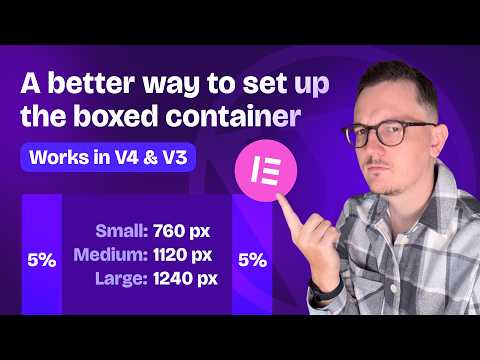
Shows how to set up boxed containers in Elementor V4 using several container widths on a 12-column grid, then a single-container padding formula that also works with V3 containers. Aimed at people already building websites in Elementor.
Sets up a full CSS framework in Bricks 2.2, applying the class and variable ideas from earlier.
Shows how to set up a starter CSS framework in Bricks Builder 2.2 or later using its Framework tools: a Theme Style, a colour palette with shades, fluid typography scales and spacing variables. It then adds custom variables for CSS Grid columns, corner radius and line heights, and exports the classes and styles for reuse in future projects.
Optional: adds more on Bricks 2.2 colour palettes with light and dark support and fluid typography.
A hands-on look at the framework tools in the Bricks Builder 2.2 beta for WordPress, covering colour palettes with light and dark mode support, fluid typography, spacing utilities and utility classes. It is aimed at people already building sites in Bricks who want to judge whether the beta fits their workflow.
For beginners who want to understand design systems and build shared styles and components in Figma. You will be able to set up a reusable library that your team can use.
5 lessons · 2 hr 18 min, plus 1 optional
Learning pathIntermediate → AdvancedDesign Systems
For designers and design system leads who already build components and want to keep a shared system working. You will be able to manage tokens, flexible components, governance, adoption and handoff to code.
For designers and content specialists ready to move beyond single assets, this path shows how to build, scale and govern brand identity systems using real company cases and guidelines.
For intermediate designers who want developers to build their designs accurately. You will learn to structure Figma files, prepare designs for handoff, and work alongside engineers.
;}.cls-2{fill:%2358d687;}.cls-3{fill:url(%23Degradado_sin_nombre_10);}.cls-4{fill:url(%23Degradado_sin_nombre_31);}.cls-5{fill:%238030d1;}.cls-6{fill:url(%23Degradado_sin_nombre_23);}%3c/style%3e%3clinearGradient%20id='Degradado_sin_nombre_17'%20x1='129.39'%20y1='83.35'%20x2='56.4'%20y2='162.54'%20gradientUnits='userSpaceOnUse'%3e%3cstop%20offset='0'%20stop-color='%23287d8c'/%3e%3cstop%20offset='1'%20stop-color='%2350b5db'/%3e%3c/linearGradient%3e%3clinearGradient%20id='Degradado_sin_nombre_10'%20x1='449.01'%20y1='190.97'%20x2='266.02'%20y2='78.2'%20gradientUnits='userSpaceOnUse'%3e%3cstop%20offset='0'%20stop-color='%23ffe286'/%3e%3cstop%20offset='1'%20stop-color='%23ffcd1d'/%3e%3c/linearGradient%3e%3clinearGradient%20id='Degradado_sin_nombre_31'%20x1='99.7'%20y1='309.69'%20x2='146.19'%20y2='485.35'%20gradientUnits='userSpaceOnUse'%3e%3cstop%20offset='0.01'%20stop-color='%23ff9464'/%3e%3cstop%20offset='1'%20stop-color='%23b3553a'/%3e%3c/linearGradient%3e%3clinearGradient%20id='Degradado_sin_nombre_23'%20x1='547.05'%20y1='208.96'%20x2='252.56'%20y2='438.86'%20gradientUnits='userSpaceOnUse'%3e%3cstop%20offset='0'%20stop-color='%23ff7da1'/%3e%3cstop%20offset='1'%20stop-color='%23f20b4f'/%3e%3c/linearGradient%3e%3c/defs%3e%3ctitle%3efavicon%3c/title%3e%3cg%20id='_Group_'%20data-name='<Group>'%3e%3cg%20id='_Group_2'%20data-name='<Group>'%3e%3cg%20id='_Group_3'%20data-name='<Group>'%3e%3cpath%20id='_Path_'%20data-name='<Path>'%20class='cls-1'%20d='M232.54,165.43a124.47,124.47,0,0,1-106.95,60.76h0A101.77,101.77,0,0,1,23.82,124.41V0L132.31,95.94A517.46,517.46,0,0,0,232.54,165.43Z'/%3e%3cpath%20id='_Path_2'%20data-name='<Path>'%20class='cls-2'%20d='M250,0V101.78a123.87,123.87,0,0,1-17.46,63.65A517.46,517.46,0,0,1,132.31,95.94L23.82,0Z'/%3e%3cpath%20id='_Path_3'%20data-name='<Path>'%20class='cls-3'%20d='M476.18,226.19a518.87,518.87,0,0,1-243.64-60.76A123.87,123.87,0,0,0,250,101.78V0A226.12,226.12,0,0,1,476.18,226.19Z'/%3e%3cpath%20id='_Path_4'%20data-name='<Path>'%20class='cls-4'%20d='M232.54,334.57a517.71,517.71,0,0,0-100.23,69.54L23.82,500V375.59A101.77,101.77,0,0,1,125.59,273.81h0A124.47,124.47,0,0,1,232.54,334.57Z'/%3e%3cpath%20id='_Path_5'%20data-name='<Path>'%20class='cls-5'%20d='M250,398.22V500H23.82l108.49-95.89a517.71,517.71,0,0,1,100.23-69.54A123.87,123.87,0,0,1,250,398.22Z'/%3e%3cpath%20id='_Path_6'%20data-name='<Path>'%20class='cls-6'%20d='M476.18,273.81A226.12,226.12,0,0,1,250,500V398.22a123.87,123.87,0,0,0-17.46-63.65A518.87,518.87,0,0,1,476.18,273.81Z'/%3e%3c/g%3e%3c/g%3e%3c/g%3e%3c/svg%3e)